There are no data to show here right now.
A mobile device stops working properly at a bank branch. An application needs to be updated. A configuration has changed. A policy has not been applied correctly.
None of these sounds like a major incident.
But when the device is hundreds of kilometres away from the IT team responsible for managing it, even a routine issue can turn into several calls, escalations, coordination with branch staff, and sometimes an on-site visit.
That support model may work when there are a handful of devices. It becomes harder to sustain across a large branch network.
Banks are using more corporate-owned devices for employee access to business applications, customer assistance, communication, field activities, and other operational tasks. As those devices spread across branches and offices, IT has to manage the same environment without being physically present at every location.
That is where remote device management changes the equation.
Travel is the obvious cost of on-site IT support, but it is rarely the only one.
Consider a branch device that needs:
If IT cannot inspect or manage that device remotely, resolving the issue starts depending on people at the branch.
Someone has to explain what is happening. The central team has to determine the device state. Screenshots, calls or remote guidance may follow. Another team may need to get involved. If the problem still cannot be resolved, physical support may be required.
Meanwhile, the employee may be working with limited access—or not using the device at all.
For one branch, that delay may be tolerable. Repeat the same process across dozens or hundreds of locations and it starts consuming a meaningful amount of IT capacity.
The underlying problem is straightforward: the devices are spread across the organisation, while much of the technical administration remains centralized.
Without a common management layer, IT may first need to establish basic facts every time something goes wrong:
Which device is affected? What applications are installed? Which policy is currently applied? Is the configuration correct? Has something changed since the device was last checked?
That investigation takes time before corrective action even begins.
The problem also extends beyond support tickets. When devices are administered individually, configuration differences can build up between branches. One device may have an older application version. Another may be missing a required policy. A third may have settings that no longer match the intended standard.
At that point, IT is no longer dealing with isolated device problems. It is managing consistency across a distributed device estate.
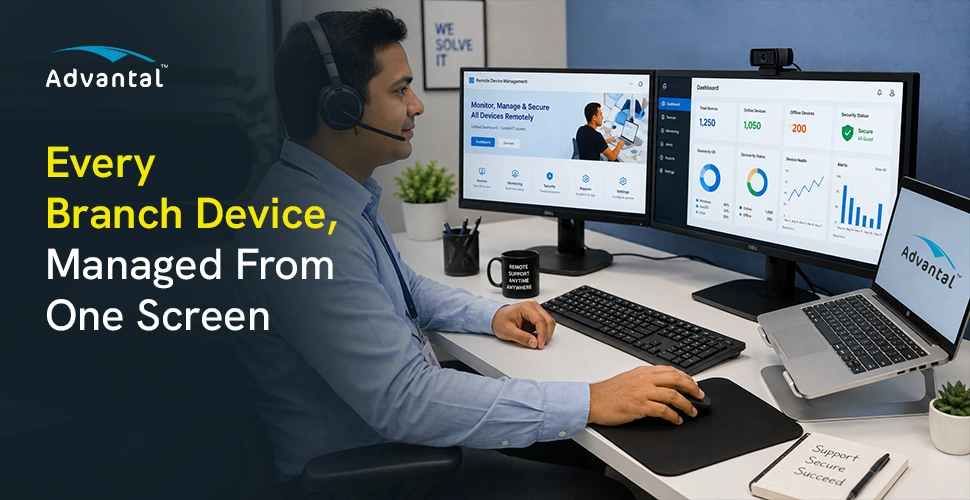
Mobile Device Management gives IT teams a central point from which supported corporate-owned devices can be viewed and administered.
The practical value is simple: many routine actions no longer depend on somebody being next to the device.
IT teams can maintain visibility into enrolled devices and their managed status, apply policies across relevant device groups, manage approved business applications, maintain defined configurations, and initiate supported administrative actions remotely.
Take a policy change as an example.
Without centralized management, applying that change across multiple branch devices may involve separate coordination at each location. With MDM, the policy can be managed centrally and applied to the relevant managed devices from the administration platform.
The same principle applies to application management and supported configuration changes.
Instead of repeating the same operational task branch by branch, IT manages it once from a common control point.
Reducing avoidable travel matters, particularly across a geographically distributed branch network. But the larger gain is in how support work is handled.
When IT can see the managed state of a device remotely, diagnosis can begin earlier. When the required action can also be performed remotely, the team does not need to wait for physical access before attempting a fix.
That can shorten the time between an issue being reported and the device returning to normal use.
It also reduces the amount of device administration pushed onto branch employees. Staff at a branch should not need to become an extension of the IT team simply because the endpoint happens to be located there.
Centralized management keeps more of that responsibility with the people who are supposed to own it.
There is another operational benefit: consistency.
Policies, approved applications and supported configurations can be managed centrally instead of relying on repeated manual intervention across individual branches. That gives IT a better chance of keeping devices aligned with the organisation’s intended operating standard.
Remote management does not make physical IT support unnecessary.
A damaged device still needs physical attention. So does a hardware failure, cabling problem, power issue or another fault that cannot be corrected through software.
The point is not to eliminate branch visits.
It is to stop using a branch visit for work that never required one in the first place.
If IT can handle policy changes, application administration, configuration updates, device checks and supported administrative actions centrally, engineers can spend their on-site time on problems that actually require hands-on intervention.
That is a much more efficient use of technical resources.
There is a difference between responding to individual device problems and managing an entire distributed device environment.
A problem occurs → a ticket is raised → IT investigates → corrective action is taken.
A centrally managed environment gives IT another layer of control before and during that process.
Devices remain visible. Policies are managed centrally. Applications can be controlled. Configurations can be standardized. Supported actions can be initiated without first bringing the device back to IT.
That does not remove incidents, but it changes how dependent their resolution is on physical location.
For banks with large branch networks, that difference becomes increasingly important as the number of managed devices grows.
Advantal MDM provides a centralized management layer for corporate-owned devices operating across distributed banking and financial environments.
IT teams can use the platform to maintain visibility of managed devices, administer device policies, manage business applications, standardize supported configurations, and perform remote administrative actions from a central console.
The value is not simply the ability to manage a larger number of devices.
It is the ability to manage devices in different locations without treating distance as a requirement for every support action.
Bank branches may be distributed across cities, states and regions.
Device administration does not need to be.
Reach out to explore opportunities, partnerships, or careers with us. Or simply fill out the form for business inquiries - we typically respond within 24 business hours.